
Building JSONiq Language Tools, Part 2
Designing a release flow for a monorepo with npm, Java, and VS Code artifacts
In the last chapter, I briefly mentioned that I’m currently using a monorepo setup, which makes local debugging easier. Besides that, I also find it helpful for publishing packages.
The release and runtime dependency graph of these components can be represented as the following:
flowchart LR
    A[VS Code Extension] -->|npm dependency| B(Language Server)
    B -->|runtime wrapper asset| C[[Java LSP Wrapper]]
Each of them has its own version number and release policy, so I need to handle them carefully.
| Package | Published to |
|---|---|
rumble-lsp-wrapper | GitHub release assets |
jsoniq-language-server | npm |
jsoniq-vscode | VS Code Marketplace |
H2
Where to upload the .jar file
For features like static type inference, I decided to reuse the existing code from RumbleDB. Internally, it has a data structure called StaticContext, which contains the static type of expressions before executing the query.
Based on that, I have created a small Java library that:
- Receives a query
- Parses the query using RumbleDB (without executing it)
- Traverses the intermediate tree representation and extracts the types of variables and functions
- Re-parses the query using a stricter configuration so that static typing errors are thrown and caught
The library is compiled into a standalone .jar file, and the language server starts a child process to communicate with it in the background at runtime.
The biggest problem is the file size: the standalone jar file for this library is roughly 310 MB, because RumbleDB depends on Spark and Hadoop, and I do not have a good way to remove them from the dependency graph even when I do not execute the query.
I later found that there are ways to make the resulting jar file smaller by creating a thin jar and excluding the Spark and Hadoop files. However, if the code accesses any of them at runtime, a
ClassNotFoundExceptionwill be thrown.For now, I would rather focus on building features than fighting the build system.
Initially, I thought about distributing the jar file together with the language server source code on npm. Later I realized that this was not a good idea because:
- Npm has size limit per package.
- Release of LSP wrapper and language server should not be coupled. Sometimes I do upgrade in language server without modifying LSP wrapper, so it should not be re-uploaded.
So I decided to use GitHub Release Assets to store the jar file. When releasing a new version of the LSP wrapper, an uber jar containing all dependencies is created and attached to the corresponding GitHub release. A rumble-lsp-wrapper-release-manifest.json file is also created, which contains all the metadata needed to download the jar at runtime:
{
    "tag": "rumble-lsp-wrapper@0.4.0",
    "releaseName": "rumble-lsp-wrapper@0.4.0",
    "releaseUrl": "https://github.com/RumbleDB/jsoniq-lsp/releases/tag/rumble-lsp-wrapper%400.4.0",
    "assetName": "rumble-lsp-wrapper-0.4.0-all.jar",
    "jarUrl": "https://github.com/RumbleDB/jsoniq-lsp/releases/download/rumble-lsp-wrapper%400.4.0/rumble-lsp-wrapper-0.4.0-all.jar",
    "jarSha256": "fc56c6d3c439eb0d778a095d0952cc4ace7ceaf08a34bc2edb124e11040f7c2e",
    "jarSizeBytes": 348789353,
    "wrapperVersion": "0.4.0",
    "createdAt": "2026-06-13T09:01:45.648Z",
    "commitSha": "6374ce8d7b50bea810f48162c885a7d6c8bd52b0"
}
When releasing a new version of the language server, this manifest file is copied into the assets folder and included in the npm package. More precisely, the release script checks whether a wrapper release already exists for the current wrapper version. If it does, it reuses the existing rumble-lsp-wrapper-release-manifest.json; otherwise, it builds and publishes the wrapper first, then embeds the resulting manifest into the language server package as assets/wrapper/release-manifest.json.
When the language server starts, it checks whether the jar file already exists locally and whether the hash matches. If not, it downloads the jar remotely. This guarantees that when a new version of the language server is released without a new LSP wrapper, users do not need to download the jar again.
The downloaded wrapper jar is stored in the user cache directory rather than inside the extension itself, which is what makes wrapper releases reusable across multiple language server versions. On startup, the language server not only checks whether the wrapper jar already exists locally, but also verifies the file size and SHA-256 hash before reusing it.
H2 Node.js bundle
For the language server, I used tsdown to generate two build variants, both in ESM format. One is a normal, tree-shakable build, and the other is a bundled build that inlines the runtime dependencies needed by the extension. The bundled variant is useful for the VS Code extension, because it lets me ship the entire language server in a single file without including node_modules.
In 2026, we should probably ship JavaScript libraries in ESM format only. Unfortunately, VS Code extensions still do not support ES modules as their entry format, so the extension itself still needs to be shipped as CommonJS. See issue: Enable consuming of ES modules in extensions · Issue #130367 · microsoft/vscode.
This is not a major issue for me, because it only affects the bundling format of the VS Code extension, not the language server itself. I can still write everything in ESM syntax and ask rolldown to bundle it into CommonJS:
import { defineConfig } from "rolldown";

export default defineConfig({
    input: "./src/extension.ts",
    output: {
        file: "./dist/extension.js",
        format: "cjs",
        sourcemap: process.env.BUILD !== "production",
        minify: process.env.BUILD === "production",
    },
    external: ["vscode"],
    platform: "node",
    treeshake: true,
});
H2 Integrating Changesets tool
I have integrated changesets into the repository. Using the CLI tool pnpm changeset add, I can record the scope of a change and the version bump it should trigger (major / minor / patch). After these changesets are merged into main, the release workflow will create or update a pull request that collects all pending version bumps for the next release.
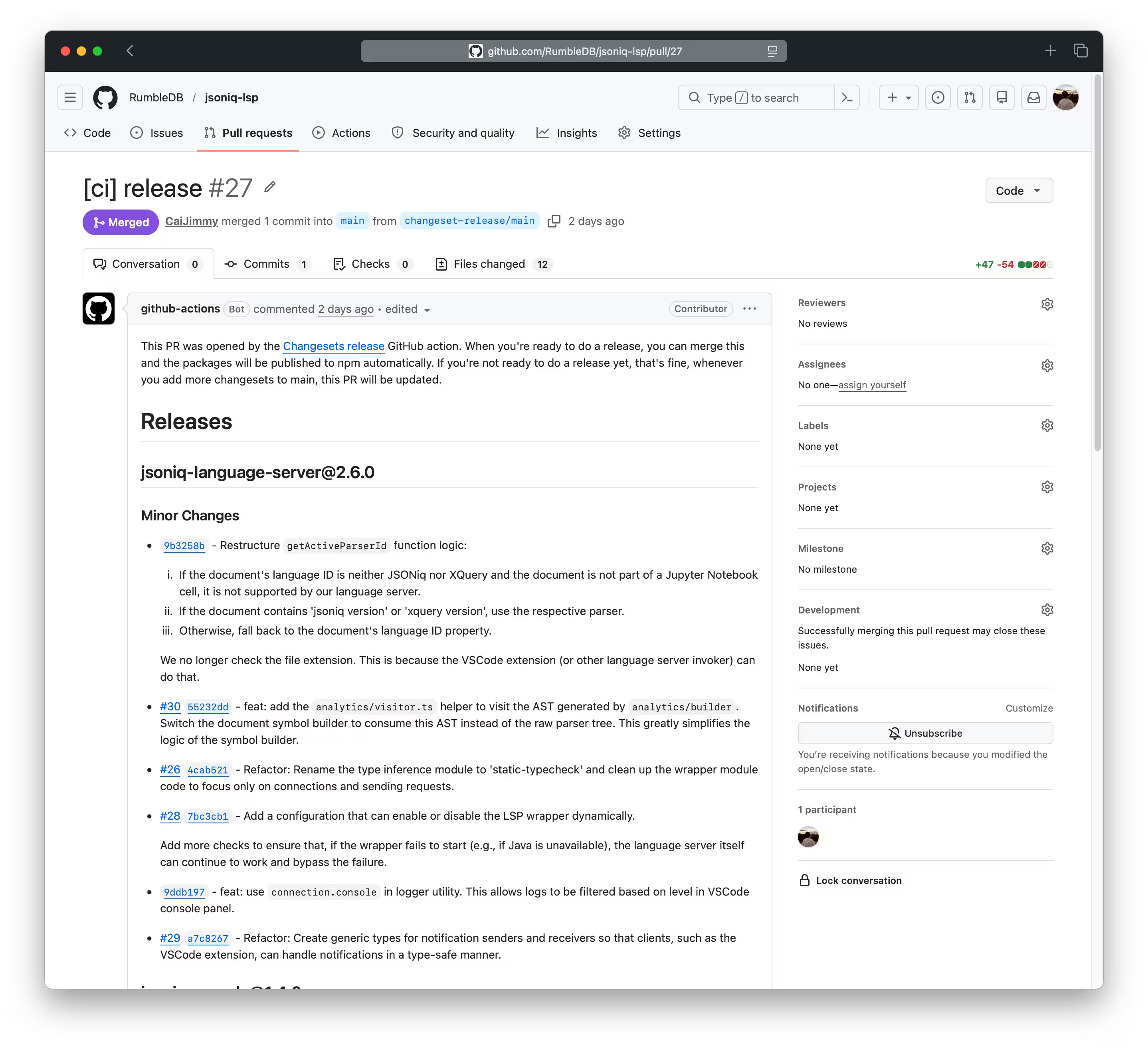
Merging the pull request will bump version numbers automatically, which is very convenient. The only problem is that it only supports package.json, which means that for other ecosystems like Java, which uses pom.xml, I need some workarounds.
In my case, I defined the version number as a variable in pom.xml and created a separate build script that reads the real version number from package.json, fetches the required RumbleDB artifacts, and then invokes mvn package -Drevision=${packageJson.version}.
<groupId>org.jsoniq.lsp</groupId>
<artifactId>rumble-lsp-wrapper</artifactId>
<version>${revision}</version>
<packaging>jar</packaging>
<name>rumble-lsp-wrapper</name>
By default, the Changesets GitHub Action can create GitHub releases automatically. I disabled this behavior because I need to attach release assets manually. Initially, I tried to define the release script directly in the workflow YAML, but I found that too difficult and error-prone, so I moved the logic into separate scripts instead.
H2 Release flow
This is the summary of the final release flow:
One nice property of this setup is that the release script is mostly idempotent: before publishing the language server, it checks whether the target name@version already exists on npm, and before publishing the wrapper, it checks whether the wrapper release already exists on GitHub.
flowchart TD
    A[Is language server unpublished on npm or extension release missing?]
    B[Ensure wrapper release exists for current wrapper version]
    C[Reuse existing wrapper release manifest]
    D[Build wrapper and upload jar + wrapper manifest to GitHub release]
    E[Build language server]
    F[Embed wrapper release-manifest.json in language server package]
    G[Attach language server .tgz to GitHub release]
    H[Publish language server to npm]
    I[Build VSCode extension against published or local language server package]
    J[Package .vsix and attach to GitHub release]
    K[Publish extension to VSCode Marketplace]

    A -->|No| Z[Done]
    A -->|Yes| B
    B -->|Wrapper release exists| C
    B -->|Missing| D
    C --> E
    D --> E
    E --> F --> G
    G --> H --> I --> J --> K
H3 NPM package
I have used Trusted Publishing to publish packages to npm. There is no need to create a long-lived access token, but all the configuration values (repository owner and name, GitHub workflow filename, and optional environment name) need to match exactly, otherwise authentication will fail.
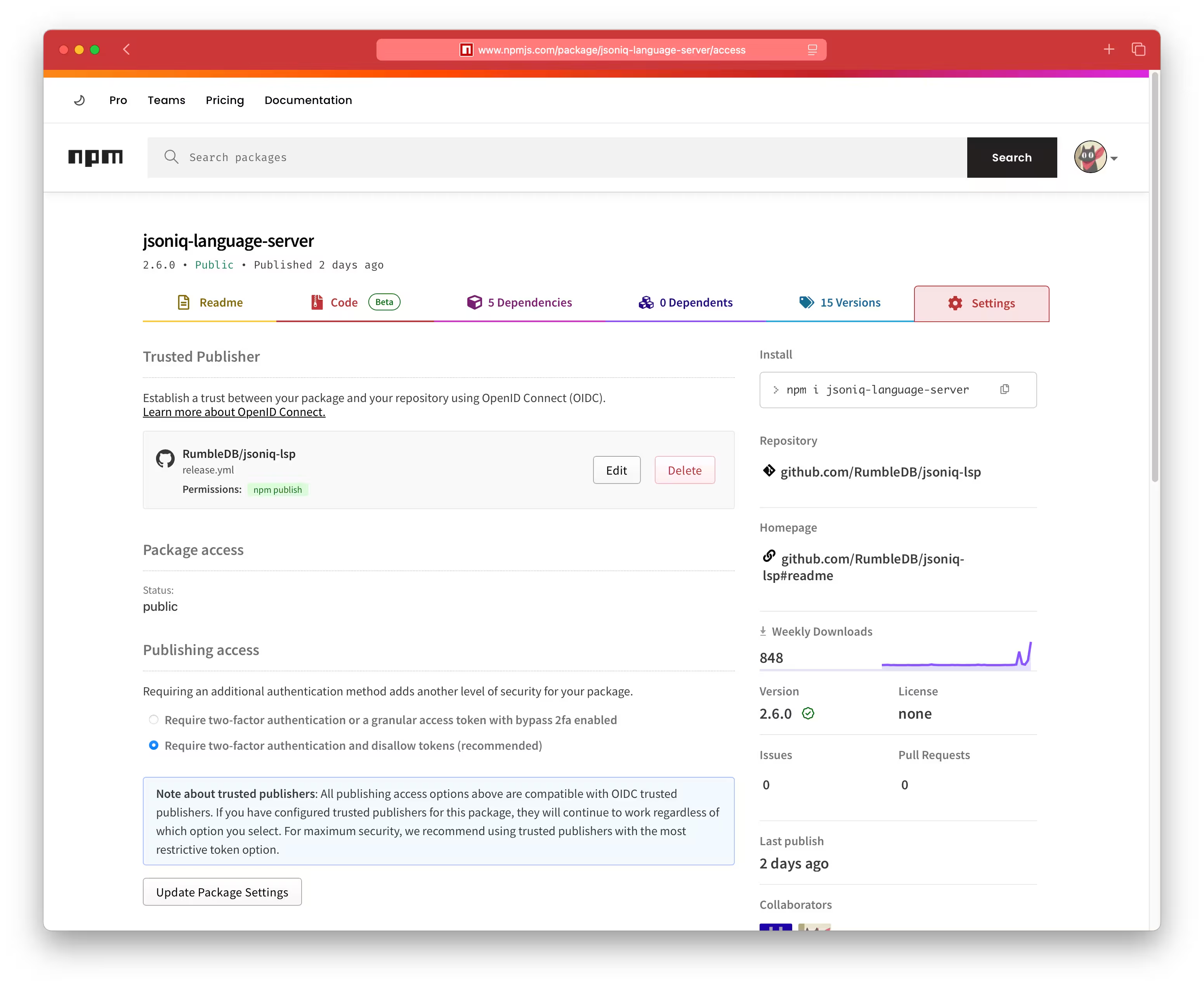
I would say that this is very comfortable to use. One current limitation is that each npm package can only have one trusted publisher configured at a time. In PyPI, multiple trusted publishers can be configured simultaneously. It would also be nice to have a TestPyPI equivalent so that I could test the workflow without deleting packages afterward.
On the GitHub Actions side, this also requires enabling id-token: write permission in the workflow so npm can verify the OpenID Connect identity.
H3 VSCode extension
This part was more painful, because it involved not only creating a new organization in the VS Code Marketplace, but also dealing with Azure and Azure DevOps. For more detailed instructions, see Publishing Extensions.
At the time of writing, the Visual Studio Code documentation already recommends secure automated publishing with Microsoft Entra ID for CI pipelines. My current release workflow still uses a
VSCE_PAT, because that was the simplest path to get working first, but Entra-based publishing is likely the better long-term setup. From what I understand so far, the documented identity-based flow is centered around Azure Pipelines.
If you use PAT-based publishing, you also need to manage token expiration and rotation.
Another issue is that vsce, the VS Code Extension Manager, does not work well with pnpm’s node_modules layout. So if you try to run vsce package directly in this workspace, you will hit errors like this:
╰─❮ pnpm exec vsce package
ERROR  Command failed: npm list --production --parseable --depth=99999 --loglevel=error
npm error code ELSPROBLEMS
npm error extraneous: @oxc-project/types@0.129.0 /Users/jimmy/Documents/Thesis/jsoniq-lsp/packages/vscode-extension/node_modules/@oxc-project/types
npm error extraneous: antlr-ng@1.0.10 /Users/jimmy/Documents/Thesis/jsoniq-lsp/packages/vscode-extension/node_modules/antlr-ng
npm error extraneous: antlr4-c3@3.4.4 /Users/jimmy/Documents/Thesis/jsoniq-lsp/packages/vscode-extension/node_modules/antlr4-c3
npm error extraneous: antlr4ng@3.0.16 /Users/jimmy/Documents/Thesis/jsoniq-lsp/packages/vscode-extension/node_modules/antlr4ng
...
To solve this, when packaging the extension, I delete the node_modules folder and reinstall everything using npm. But because I rely on pnpm’s workspace protocol to reference the language server, I need to manually override the language server dependency before installing:
function cleanVsCodeExtensionInstall(): void {
    /// vsce does not support pnpm's node_modules layout, so package from a clean npm install.
    run("rm", [
        "-rf",
        `${VSCODE_EXTENSION_PACKAGE_DIR}/node_modules`,
        `${VSCODE_EXTENSION_PACKAGE_DIR}/package-lock.json`,
    ]);
}

function setVsCodeExtensionLanguageServerDependency(versionSpec: string): void {
    const languageServerPackage = readPackage(LANGUAGE_SERVER_PACKAGE_DIR);
    run("npm", ["pkg", "set", `dependencies.${languageServerPackage.name}=${versionSpec}`], {
        cwd: VSCODE_EXTENSION_PACKAGE_DIR,
    });
}

function installAndBuildVsCodeExtension(): void {
    run("npm", ["install"], { cwd: VSCODE_EXTENSION_PACKAGE_DIR });
    run("npm", ["run", "build:prod"], { cwd: VSCODE_EXTENSION_PACKAGE_DIR });
}

function build() {
    const languageServerPackage = readPackage(LANGUAGE_SERVER_PACKAGE_DIR);

    /// If we have just released a new version of the language server, it might not yet be visible on the npm registry.
    /// In that case, install it directly from the file.
    const languageServerDependency =
        languageServerPackagePath === undefined
            ? languageServerPackage.version
            : `file:${languageServerPackagePath}`;

    cleanVsCodeExtensionInstall();
    setVsCodeExtensionLanguageServerDependency(languageServerDependency);
    installAndBuildVsCodeExtension();
}
If I have just released a new version of the language server, it might not yet be visible on the npm registry, which would cause installation to fail. In that case, I install it via the file: protocol by pointing it to the tar.gz file.
See
scripts/releasefor all the script that I have used: jsoniq-lsp/scripts/release at main · RumbleDB/jsoniq-lsp
H2 Fin
The release flow ended up more complex than I expected, but I am happy with the result.
The most useful aspect of this setup is probably the separation of the publishing process for the npm package and the large Java wrapper asset. This design choice makes it possible to keep releases flexible without forcing users to download hundreds of megabytes again every time the language server changes.